
out walking
life of a tinker
bridge to nowhere
My toothbrush lives in a tube in my everyday bag, and like most of my stuff is also rainbow.
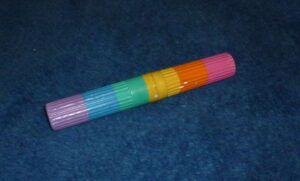
This is actually the second version of my toothbrush tube. The previous version was wrapped in painted hockey tape. It got really dirty after a while, so it had to go.
Now the tube is covered in acrylic paint and Mod Podge, which is basically white glue, leaving a plastic finish.
Having something looking like this got the attention from greyhound security when they searched my carry on bag. This is a thing Greyhound does now, they check carry on bags for weapons and stuff, and make everyone empty their pockets, at the occasional terminal. I got to see quite a look of surprise on the security person’s face when they opened the tube and found a toothbrush.
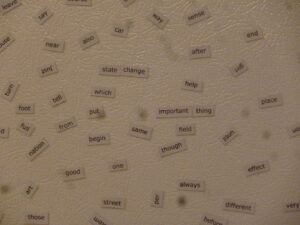
“The nest has fridge poetry” has been on the wall for several months.
The last person I saw with some on her fridge said that she had made it themselves, I think that was the story.
Today I went to Staples up the hill and picked up a package of magnetic paper, there were four sheets in the pack. When I got back to the nest a quick Google search found do it yourself magnetic fridge poetry directions.
The parts:
– words
– word processor
– magnetic paper
– injet printer
– sissors
I took the words from the general service list, as the directions suggested. Put the text of the word list in a text editor, cut the extra bits out of the text leaving only a list of words one per line. Took that list and joined the lines together separated by three spaces resulting in a long spaced out line. Put that long line in OpenOffice writer, set the font to “Verdana” 12pt and collapsed the margins. Printed the first page. And cut up the magnet with scissors.
I still have two and a bit sheets of magnetic paper, I think I will do an analysis of one of my programming projects and find the most common words and symbols and make a sheet from that. Programmer fridge poetry, is that a thing yet? I can find Geek Fridge Poetry, but none for Java. Interesting.
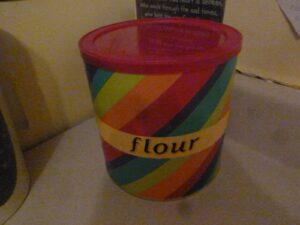
I had an empty large container that formerly contained ground coffee, and wanted to put flour on the counter for easier access when making bread. After cleaning the container out and drying it well it worked well. Later I had an empty flour bag and decided to make a label from it. Even later I was at a Dollarama with Cassandra and she pointed out some rainbow wrapping paper and mentioned that I can cover things with it. With much gratitude I covered the silver container with Mod Podge and wrapping paper, another layer of Mod Podge and the label, and another over top of the label to seal it all down.
The nest where I live is drafty, and the weather is getting cold again. Last year I tried foam tape around the doors with the effect of making the door hard to close and still drafty. The nest didn’t get above 15c in the depth of winter, so I set the kitchen temperature to 10c and left the rest off. The power bill was $150/month.
Last spring I went on a mission to get a bunch of my stuff from storage in Halifax, including a big bag of worn out clothes and fabric scraps.
Last week I cut up the toes off some old socks and sewed them end to end making longer socks. I took these socks and stuffed them with more worn out clothes. Finally I took these stuffed socks and tacked them to the drafty doors of the nest.
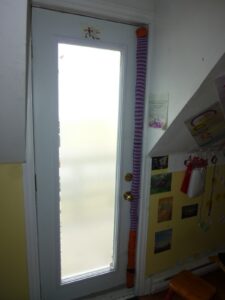
The outside door looses a lot of heat on the opening edge, and later I may do the same to the bottom of that door too. It turns out that the metal front door is wood on the narrow edges.
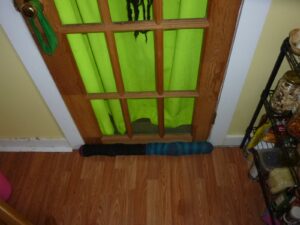
Also, the bottom room gets below zero in the winter too, and has a big gap at the bottom of the door.
Both doors work as they usually do.
Over the next few months I get to see how effective this is.
Comments:
Unknown – Thursday, November 12, 2015 at 2:39:00 AM AST
Have you thought of putting a thick curtain over the door? I made a special curtain by sewing three heavy curtains together to cover my patio door. This curtain pooled on the floor, and was 4 or 5 inches wider on both sides and about that on the top. Next time I need one I will put a curtain shelf on the top of the curtain to slow down the air leakage. Valerie
Sarah Happy – Thursday, November 12, 2015 at 8:57:00 AM AST
I do have lots of fleece that I could make curtains from. If the socks do not work well enough I may try curtains too. Last winter there was a curtain separating the upstairs of the nest, which has no water pipes to worry about, from the kitchen, keeping most of the heat out of the upstairs.
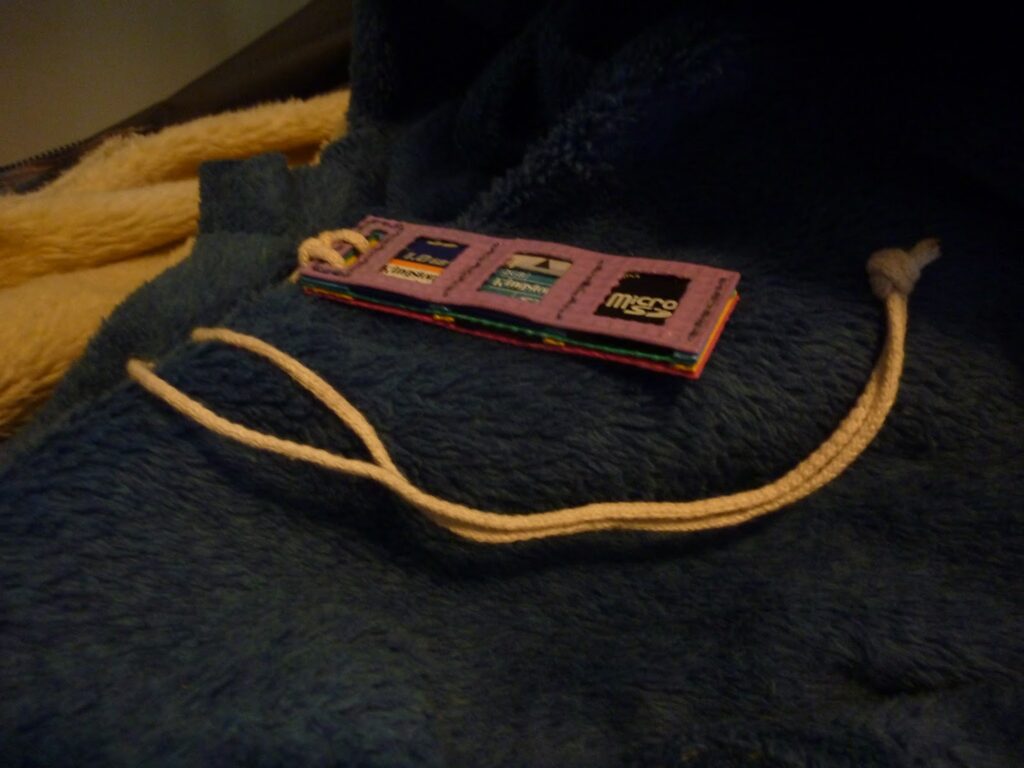
Long ago I made a memory card holder that held three cards. It traveled with me across the country at least twice, maybe all three times, and worked well to keep my memory cards from getting lost. Recently, after seeing the card holder I made for Ep1c I wanted one that looked like that for myself. So, I took the one I already had, took it apart, cut some more parts, painted it like a rainbow sandwich, and sewed it up into a memory card holder that holds six cards.
This is something I can be commissioned to make, say fifty dollar painted, or twenty unpainted?
I wanted to display my Gmail Inbox unread message count on my personal web page on Google Sites, so I made a tiny Google Apps Script widget to do this.

The code turned out very simple.
code.gs:
function doGet() {
  return HtmlService.createTemplateFromFile('page')
    .evaluate()
    .setSandboxMode(HtmlService.SandboxMode.NATIVE);
}

function getInboxUnreadCount() {
  return GmailApp.getInboxUnreadCount();
}
page.html:
<style type="text/css">
#refresh { color: blue; text-decoration: underline; }
#refresh:hover { cursor: pointer; }
</style>

<div id="inbox">
Inbox (<span id="count">...</span>)
<span id="refresh">refresh</span>
</div>

<script src="//ajax.googleapis.com/ajax/libs/jquery/1.10.2/jquery.min.js"></script>
<script>
function check() {
  clearTimeout(check.timer);
  google.script.run
    .withSuccessHandler(function(result) {
      $('#count').text(result);
      $('#inbox').toggleClass('unread', result > 0);
    })
    .getInboxUnreadCount();
  $('#count').text("...");
  check.timer = setTimeout(check, 600000);
}

$(function() {
  check();

  $('#refresh').click(check);
});

</script>
The getInboxUnreadCount() function needed to be run from the script editor to grant the needed permissions to the script, after that it worked from my personal home page.
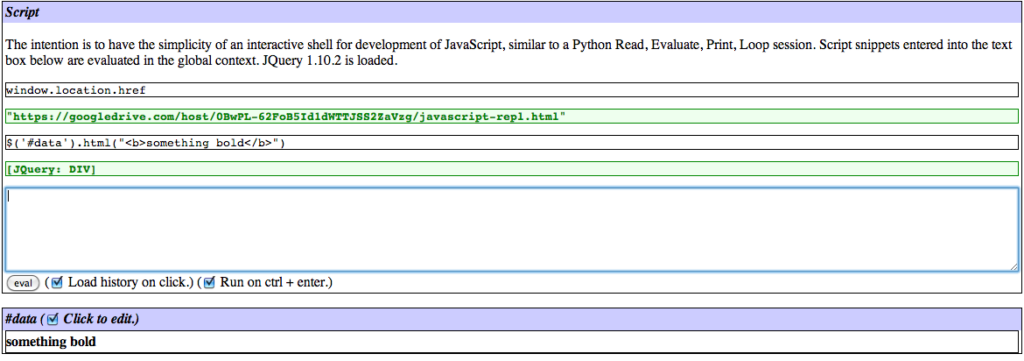
When I was traveling to a friend’s place to give her a Christmas not alone I got picked up by someone who suggested I learn jQuery… so I did, and in the process wrote a JavaScript Read Eval Print Loop that makes jQuery and JavaScript development as easy as interactive Python or BASH programming.
The result is a single file web application, JavaScript Read, Eval, Print, Loop. View the source to see what was needed to make it work.
I wanted to display my facebook notification information on my personal home screen.
I ended up with a single HTML file which I have hosted on Google Drive and embedded in an iframe in my personal home screen on Google Sites.
The end result is a single line where the numbers change if there are any notifications to report.

<html><head><title>Facebook Quick Check</title></head><body>
<style type="text/css">
body { margin: 0px; }
</style>

<div id="fb-root"></div>

<div>
    <span id="login"><a href="javascript:doLogin()">FB Login</a>: </span>
    Notice (<span id="notice">...</span>)
    Friend (<span id="friend">...</span>)
    Inbox (<span id="inbox">...</span>)
    <a href="javascript:loadStatus()">refresh</a>
</div>

<div id="out"></div>

<script src="//ajax.googleapis.com/ajax/libs/jquery/1.10.2/jquery.min.js"></script>
<script>
I wanted a fluent API that felt like Google Apps Script server calls instead of the regular Facebook API, so I made a quick one…
function FBRun(parent) {
  this.successHandler = parent ? parent.successHandler : function(result) { };
  this.errorHandler = parent ? parent.errorHandler : function(result) { };
};
FBRun.prototype.withSuccessHandler = function(handler) {
  var obj = new FBRun(this);
  obj.successHandler = handler;
  return obj;
};
FBRun.prototype.withErrorHandler = function(handler) {
  var obj = new FBRun(this);
  obj.errorHandler = handler;
  return obj;
};
FBRun.prototype.getHandler = function() {
  var obj = this;
  return function(response) {
    if(!response || response.error) {
      return obj.errorHandler(response);
    }
    return obj.successHandler(response);
  }
};
FBRun.prototype.get = function(url, data) {
  FB.api(url, 'get', data, this.getHandler());
  return this;
};
FBRun.prototype.login = function(data) {
  FB.login(this.getHandler(), data);
  return this;
}
FBRun.prototype.loginStatus = function() {
  FB.getLoginStatus(this.getHandler());
  return this;
}
fbrun = new FBRun();
Load the Facebook API and check the login status on success…
$(document).ready(function() {
  $.ajaxSetup({ cache: true });
  $.getScript('//connect.facebook.net/en_UK/all.js', function(){
    FB.init({
      appId: 'APPLICATION_KEY',
    });
    fbrun
      .withSuccessHandler(onLogin)
      .loginStatus();
  });
});
The code for the login link…
function doLogin() {
  fbrun
    .withErrorHandler(display)
    .withSuccessHandler(onLogin)
    .login({scope: 'manage_notifications,read_requests,read_mailbox'});
}

var perms = {};

function onLogin(response) {
  if(response.status === 'connected') {
    fbrun
      .withErrorHandler(display)
      .withSuccessHandler(function(response) {
        perms = response.data[0];

        if(perms.manage_notifications && perms.read_requests && perms.read_mailbox) {
          $('#login').hide();
        }
        start();
      })
      .get('/me/permissions');
  }
}

function display(response) {
  $('#out').text(JSON.stringify(response));
}
Load the information and start the refresh timer…
function start() {
  loadStatus();

  if(start.active) {
    return;
  }
  start.active = true;

  function check() {
    loadStatus();
    setTimeout(check, 600000);
  }
  setTimeout(check, 600000);
}

function loadStatus() {
  if(perms.manage_notifications) {
    $('#notice').text('...');
    fbrun
      .withErrorHandler(display)
      .withSuccessHandler(function(response) {
        if(response.summary.unseen_count != undefined) {
          $('#notice').text(response.summary.unseen_count);
        } else {
          $('#notice').text("0");
        }
      })
      .get('/me/notifications', { limit: 0 });
  } else {
    $('#notice').text('-');
  }
  if(perms.read_requests) {
    $('#friend').text('...');
    fbrun
      .withErrorHandler(display)
      .withSuccessHandler(function(response) {
        $('#friend').text(response.summary.unread_count);
      })
      .get('/me/friendrequests', { limit: 0 });
  } else {
    $('#friend').text('-');
  }
  if(perms.read_mailbox) {
    $('#inbox').text('...');
    fbrun
      .withErrorHandler(display)
      .withSuccessHandler(function(response) {
        $('#inbox').text(response.summary.unseen_count);
      })
      .get('/me/inbox', { limit: 0 });
  } else {
    $('#inbox').text('-');
  }
}
</script>
</body></html>
Update: limit the data returned to just the summaries by setting the item limit to zero.